SalesEngine
In this project you’ll practice building a system of several interacting Ruby objects using TDD.
Project Overview
Goals
- Use tests to drive both the design and implementation of code
- Use test fixtures instead of actual data when testing
- Build a complex system of relationships using multiple interacting classes
- Demonstrate the DRY principle with modules and/or duck typing
- Separate parsing and data loading logic from business logic
- Use memoization to improve performance
Abstract
Let’s write a data reporting tool that manipulates and reports on merchant transactional data.
Getting Started
- One team member clones the repository at https://github.com/turingschool/sales_engine.
cd sales_enginegit remote rm origin- Create a new repository on Github, then add that remote to your
sales_enginefrom the command line. - Push your repository to the new remote origin.
- Add your teammate(s) as collaborators.
- Create a Waffle.io account for project management.
Data Supplied
We have several files of source data including:
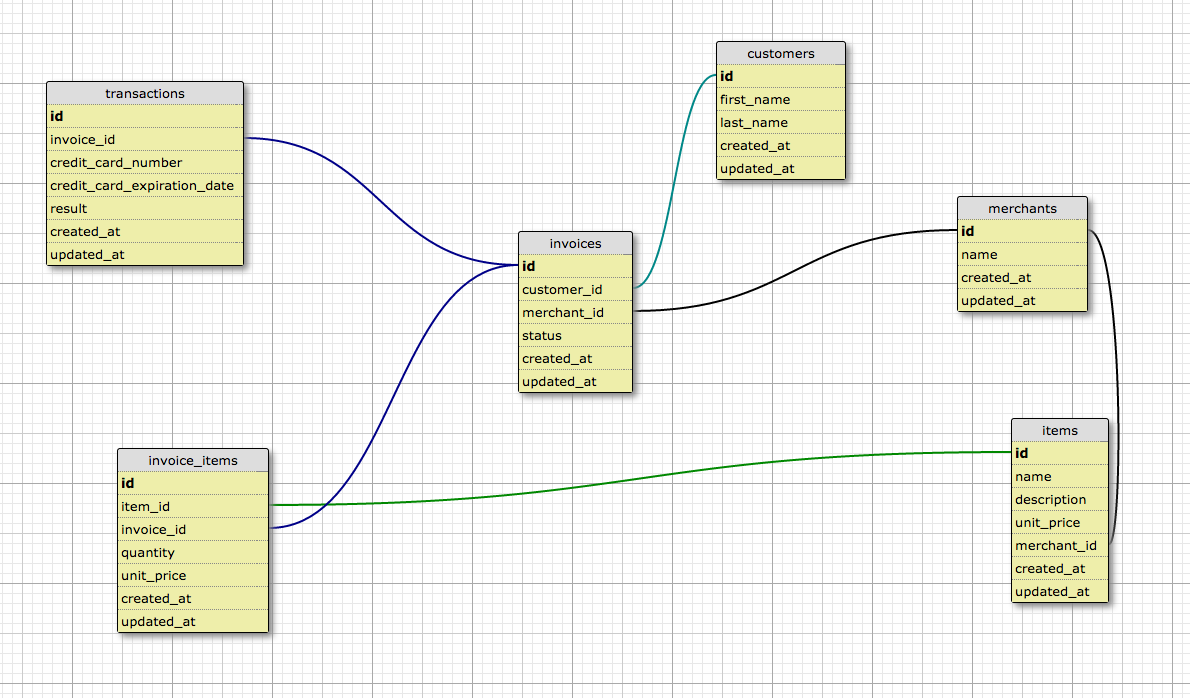
customers.csv- customer names and other attributestransactions.csv- individual transactions with a marker relating a customer, merchant, invoice, and credit cardinvoices.csv- invoices that link transactions to invoice items and hold a statusinvoice_items.csv- the item, quantity, and unit price paid for an item in a transactionitems.csv- items available for sale at the merchantsmerchants.csv- merchant names and identifying information
Dig into the data files to understand how everything is linked together. https://github.com/turingschool/sales_engine/tree/master/data
Understandings
- The data was created from customer orders where:
- One invoice connects the customer to multiple invoice items, one or more transactions, and one merchant
- At least one transaction where their credit card is charged. If the charge fails, more transactions may be created for that single invoice.
- One or more invoice items: one for each item that they ordered
- The transaction references only the invoice
- The invoice item references an item and an invoice
- The item is connected to many invoice items and one merchant
- The merchant is connected to many invoices and many items
- Prices, as represented in the CSVs, are in cents. Anytime you return a revenue total (like in
Merchant#revenue) you must return aBigDecimalrepresentating dollars and cents (two decimals, rounded to the nearest cent).
Restrictions
Project implementation may not use:
- Databases (sqlite3, PostgreSQL, MySQL, MongoDB, Redis, etc)
- Rails’
ActiveRecordlibrary or a similar object-relational mappers (includingSequel,DataMapper, etc) - Your implementation may not use
StructorOpenStruct - Metaprogramming (
method_missing,define_method, etc)
Test Independence
You should have a rake task that runs all the tests, like this:
1
| |
In addition, each of your test files must be able to run independently:
1 2 | |
Base Expectations
You are to build several classes implementing an API which allows for querying of this data including the objects and methods listed below.
Before digging too deeply into the listed methods below, you need to build a system which can parse the data files and create relationships between all the various objects.
Entry Point
After calling the following code is called, all the dependencies should be loaded up:
1 2 | |
The entry point must live in a file named lib/sales_engine, and the require statements for the other classes in the project must be require_relative:
1 2 3 4 5 6 7 8 | |
You will have a repository for each type of object:
MerchantRepository.newholds a collection ofMerchantinstancesInvoiceRepository.newholds a collection ofInvoiceinstancesItemRepository.newholds a collection ofIteminstancesInvoiceItemRepository.newholds a collection ofInvoiceIteminstancesCustomerRepository.newholds a collection ofCustomerinstancesTransactionRepository.newholds a collection ofTransactioninstances
The instance of SalesEngine will have a reference to each of these repositories, which can be accessed like so:
1 2 3 4 5 6 7 8 9 | |
Listing and Searching Collections
For each repository class you need to offer:
allreturns all instancesrandomreturns a random instancefind_by_X(match), whereXis some attribute, returns a single instance whoseXattribute case-insensitive attribute matches thematchparameter. For instance,customer_repository.find_by_first_name("Mary")could find aCustomerwith the first name attribute"Mary"or"mary"but not"Mary Ellen".find_all_by_X(match)works just likefind_by_Xexcept it returns a collection of all matches. If there is no match, it returns an emptyArray.
Relationships
Merchant
itemsreturns a collection ofIteminstances associated with that merchant for the products they sellinvoicesreturns a collection ofInvoiceinstances associated with that merchant from their known orders
Invoice
transactionsreturns a collection of associatedTransactioninstancesinvoice_itemsreturns a collection of associatedInvoiceIteminstancesitemsreturns a collection of associatedItemsby way ofInvoiceItemobjectscustomerreturns an instance ofCustomerassociated with this objectmerchantreturns an instance ofMerchantassociated with this object
InvoiceItem
invoicereturns an instance ofInvoiceassociated with this objectitemreturns an instance ofItemassociated with this object
Item
invoice_itemsreturns a collection ofInvoiceItemsassociated with this objectmerchantreturns an instance ofMerchantassociated with this object
Transaction
invoicereturns an instance ofInvoiceassociated with this object
Customer
invoicesreturns a collection ofInvoiceinstances associated with this object.
Business Intelligence
MerchantRepository
most_revenue(x)returns the topxmerchant instances ranked by total revenuemost_items(x)returns the topxmerchant instances ranked by total number of items soldrevenue(date)returns the total revenue for that date across all merchants
Merchant
#revenuereturns the total revenue for that merchant across all transactions#revenue(date)returns the total revenue for that merchant for a specific invoice date#favorite_customerreturns theCustomerwho has conducted the most successful transactions#customers_with_pending_invoicesreturns a collection ofCustomerinstances which have pending (unpaid) invoices. An invoice is considered pending if none of it’s transactions are successful.
NOTE: Failed charges should never be counted in revenue totals or statistics.
NOTE: All revenues should be reported as a BigDecimal object with two decimal places.
ItemRepository
most_revenue(x)returns the topxitem instances ranked by total revenue generatedmost_items(x)returns the topxitem instances ranked by total number sold
Item
best_dayreturns the date with the most sales for the given item using the invoice date
Customer
#transactionsreturns an array ofTransactioninstances associated with the customer#favorite_merchantreturns an instance ofMerchantwhere the customer has conducted the most successful transactions
Invoice - Creating New Invoices & Related Objects
Given a hash of inputs, you can create new invoices on the fly using this syntax:
1 2 | |
Assuming that customer, merchant, and item1/item2/item3 are instances of their respective classes.
You should determine the quantity bought for each item by how many times the item is in the :items array.
So, for items: [item1, item1, item2], the quantity bought will be 2 for item1 and 1 for item2.
Then, on such an invoice you can call:
1 2 | |
The objects created through this process would then affect calculations, finds, etc.
Extensions
Merchant Extension
MerchantRepository
dates_by_revenuereturns an array of RubyDateobjects in descending order of revenuedates_by_revenue(x)returns the topxdays of revenue in descending orderrevenue(range_of_dates)returns the total revenue for all merchants across several dates
Merchant
revenue(range_of_dates)returns the total revenue for that merchant across several dates
Invoice Extension
InvoiceRepository
pendingreturns an array ofInvoiceinstances for which there is no successful transactionaverage_revenuereturns aBigDecimalof the average total for each processed invoiceaverage_revenue(date)returns aBigDecimalof the average total for each processed invoice for a single dateaverage_itemsreturns aBigDecimalof the average item count for each processed invoiceaverage_items(date)returns aBigDecimalof the average item count for each processed invoice for a single date
NOTE: All BigDecimal objects should use two decimal places. "Processed invoice" refers to an invoice that has at least one successful transaction.
Customer Extension
CustomerRepository
most_itemsreturns theCustomerwho has purchased the most items by quantitymost_revenuereturns theCustomerwho has generated the most total revenue
Customer
#days_since_activityreturns a count of the days since their last transaction, zero means today.#pending_invoicesreturns an array ofInvoiceinstances for which there is no successful transaction
Evaluation Rubric
The project will be assessed with the following rubric:
1. Functional Expectations
- 4: Application fulfills all base expectations and two extensions
- 3: Application fulfills all base expectations as tested by the spec harness
- 2: Application has some missing functionality but no crashes
- 1: Application crashes during normal usage
2. Test-Driven Development
- 4: Application is broken into components which are well tested in both isolation and integration using appropriate data
- 3: Application is well tested but does not balance isolation and integration tests, using only the data necessary to test the functionality
- 2: Application makes some use of tests, but the coverage is insufficient
- 1: Application does not demonstrate strong use of TDD
3. Encapsulation / Breaking Logic into Components
- 4: Application is expertly divided into logical components each with a clear, single responsibility
- 3: Application effectively breaks logical components apart but breaks the principle of SRP
- 2: Application shows some effort to break logic into components, but the divisions are inconsistent or unclear
- 1: Application logic shows poor decomposition with too much logic mashed together
4. Fundamental Ruby & Style
- 4: Application demonstrates excellent knowledge of Ruby syntax, style, and refactoring
- 3: Application shows strong effort towards organization, content, and refactoring
- 2: Application runs but the code has long methods, unnecessary or poorly named variables, and needs significant refactoring
- 1: Application generates syntax error or crashes during execution
5. Enumerable & Collections
- 4: Application consistently makes use of the best-choice Enumerable methods
- 3: Application demonstrates comfortable use of appropriate Enumerable methods
- 2: Application demonstrates functional knowledge of Enumerable but only uses the most basic techniques
- 1: Application demonstrates deficiencies with Enumerable and struggles with collections
6. Code Sanitation
The output from rake sanitation:all shows…
- 4: Zero complaints
- 3: Five or fewer complaints
- 2: Six to ten complaints
- 1: More than ten complaints